
Early access
Everything
Every feature, every update, one workspace, your whole team.
TBCfree while in early access
No credit card, cancel any time. Pricing announced to early customers first.
Talk to us about pricingVisitor management for New Zealand workplaces
Janus runs your front desk: a kiosk that greets every visitor, QR codes that let expected guests walk straight in, hosts told the moment someone arrives, and an evacuation roll call that works when it matters.
No credit card · Runs on the iPad you already have · Built in New Zealand


Janus does your sign-ins, pre-registrations, host alerts, site inductions, visitor agreements, contractor tracking, watchlist checks, evacuation roll calls, staff presence, visit reports and the front desk
One kiosk, one visitor record, and nobody standing at reception wondering who to call.
The door
Visitors sign themselves in on a tablet at the door — your branding, your welcome video, your questions. Walk-ins take seconds; returning visitors are recognised by their email or phone and skip the typing.

Expected visitors
Pre-register a visitor and they get a confirmation with a QR code. Their phone camera opens it straight onto their visit; the kiosk scans it too — and the same code signs them out on the way back through.

The host
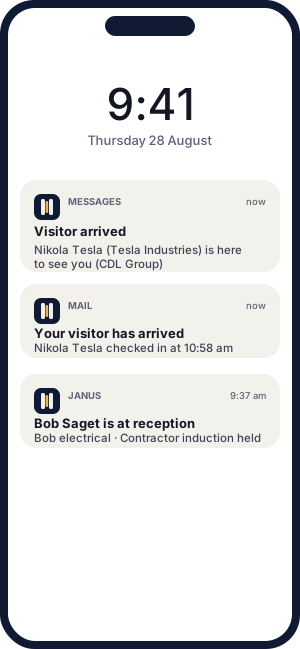
The moment someone checks in, their host hears about it — by email, text message, in-app notification, or all three. Each host picks their channel, and every message is delivered exactly once.

Compliance
Contractors watch the induction, answer the questions, and can't sign in until they pass — marked by the server, not the honour system. Agreements are accepted with a tap, and every acceptance is on record with a name and a timestamp.


When the alarm goes
A warden scans the evac poster, enters the PIN, and has everyone on site — visitors and staff — on their phone. Tick people off as safe or off-site; every warden's phone updates live, and every tick records who marked it and when.

What it does
Janus is deliberately a visitor system, not a kitchen sink. Here is the full spread — every plan gets all of it.
01
Kiosk sign-in on any tablet·Sign-in by phone from a poster QR·Walk-ins, expected visitors and groups·Custom questions and screening·Visitor photos and badges
02
Pre-registration with QR confirmation·Reminder emails before the visit·Returning-visitor lookup·Visitor portal for pre-arrival paperwork·Anonymise on request — PII actually erased
03
Arrival alerts by email, TXT or in-app·Per-host channel choice·Overstay alerts·Host directory with bulk import
04
Site inductions with video and quizzes·Visitor agreements, accepted on record·Competency expiry tracking·Watchlist with discreet alerts
05
Kiosk evacuation trigger, PIN-gated·Evac QR posters per assembly point·Live roll call with mark-safe·Staff presence — who's in the building·Drill history for the safety audit
06
Every visit searchable and exportable·Reports with totals and trends·A full audit trail, automatically·Tenant-customisable email templates
Straight up
Pricing
Nothing will be held back for a higher tier — inductions, TXT alerts, evacuation, reports: it is all in. What it costs is still being settled, and we would rather say TBC than guess at you.
Early access
Every feature, every update, one workspace, your whole team.
TBCfree while in early access
No credit card, cancel any time. Pricing announced to early customers first.
Talk to us about pricingSeveral receptions, a fleet of kiosks, or visitor policy that needs a conversation — talk to us and we will walk it through with you.
Questions
A tablet for the front desk — the iPad you already have is fine — and a wall for the poster QR. There is nothing proprietary to buy: the kiosk is an app, the posters are printed from Settings, and visitors' own phones do the rest.
No. Visitors sign in on the kiosk, or scan a QR with their phone camera and use the browser. The confirmation email carries their QR code; nothing to install, ever.
Through a New Zealand SMS carrier. Each host chooses email, TXT or both; messages are delivered exactly once — the system is built so a retry can never double-send a text.
The roll call does not live on the kiosk. Wardens scan the printed poster at the assembly point and run the list on their own phones — several wardens at once, all seeing the same ticks live. The kiosk button is just one way to raise the alarm.
Yes. Invite them to the visitor portal and they can watch the induction, sit the quiz and accept the agreement from their desk. At the door, they scan their QR and walk in.
Your workspace's data is yours: visitors are never shared across customers, exports are self-service, and a visitor who asks to be forgotten is genuinely anonymised. Sign-in lookups are built to never leak one visitor's details to another.
A workspace, a sign-in point and a kiosk pairing take about ten minutes. Bring a CSV of hosts and the directory imports in one step; print the poster and the phone flow is live the same morning.
Ready when you are
Set up the kiosk this morning, and by afternoon every arrival is signed in, inducted, badged and on the list.
No credit card · Runs on your iPad · Built in New Zealand